
Solution · Software delivery
Turn requirements documents into documented work in Jira
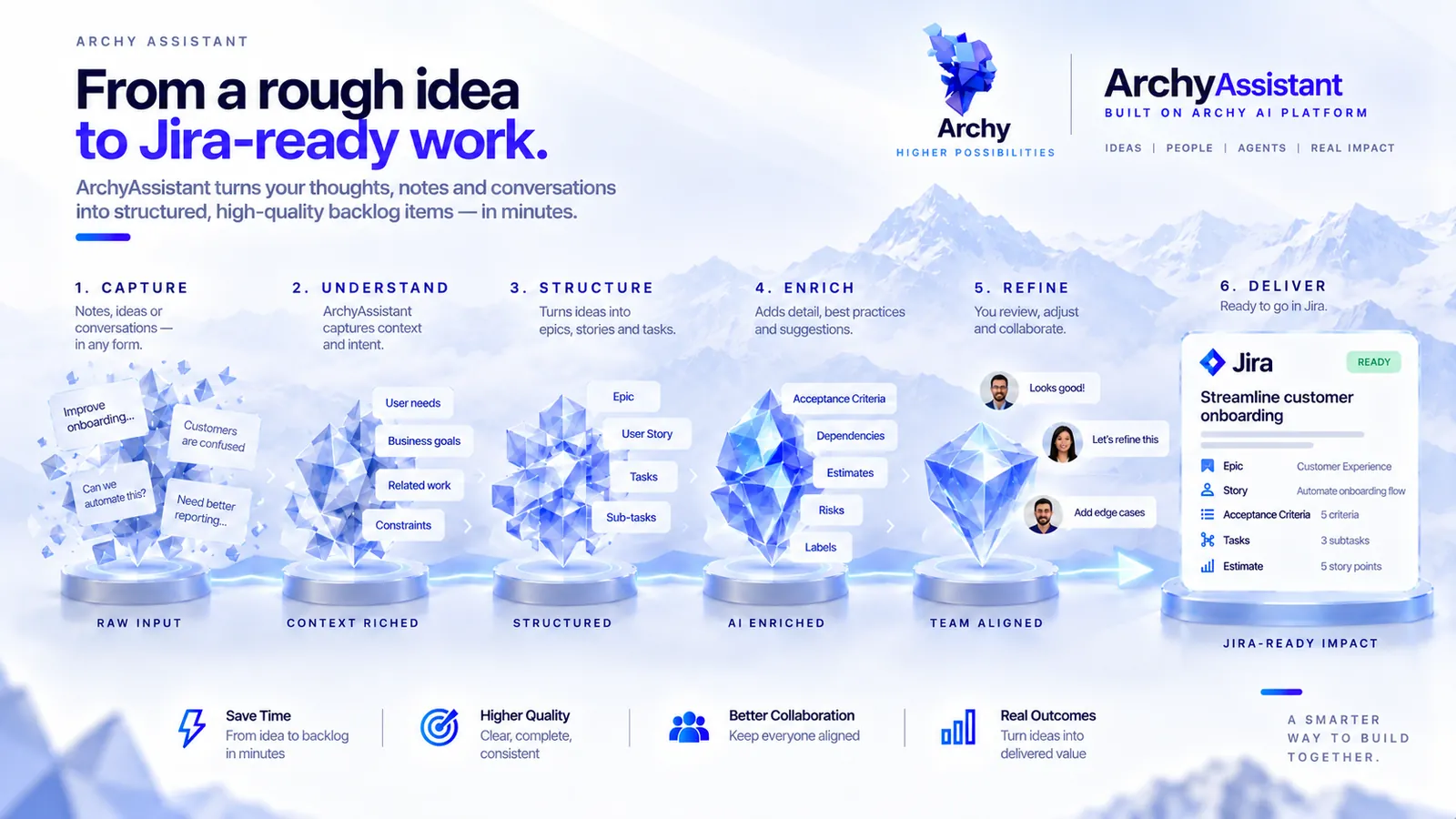
New requirements usually arrive as documents with gaps, and every team writes them up differently. With ArchyAssistant, the gaps are filled through guided questions, and every feature request comes out fully documented to your organisation's standards. As AI speeds up delivery, leaders get clear summaries of what changed across projects.
Before and after
What changes in the delivery work.
| The work | Today | With Archy |
|---|---|---|
| Intake | Requirements arrive as documents with gaps. Clarifying them takes meetings and long comment threads. | ArchyAssistant reads the intake document, asks about what is missing or unclear, and builds on your answers. |
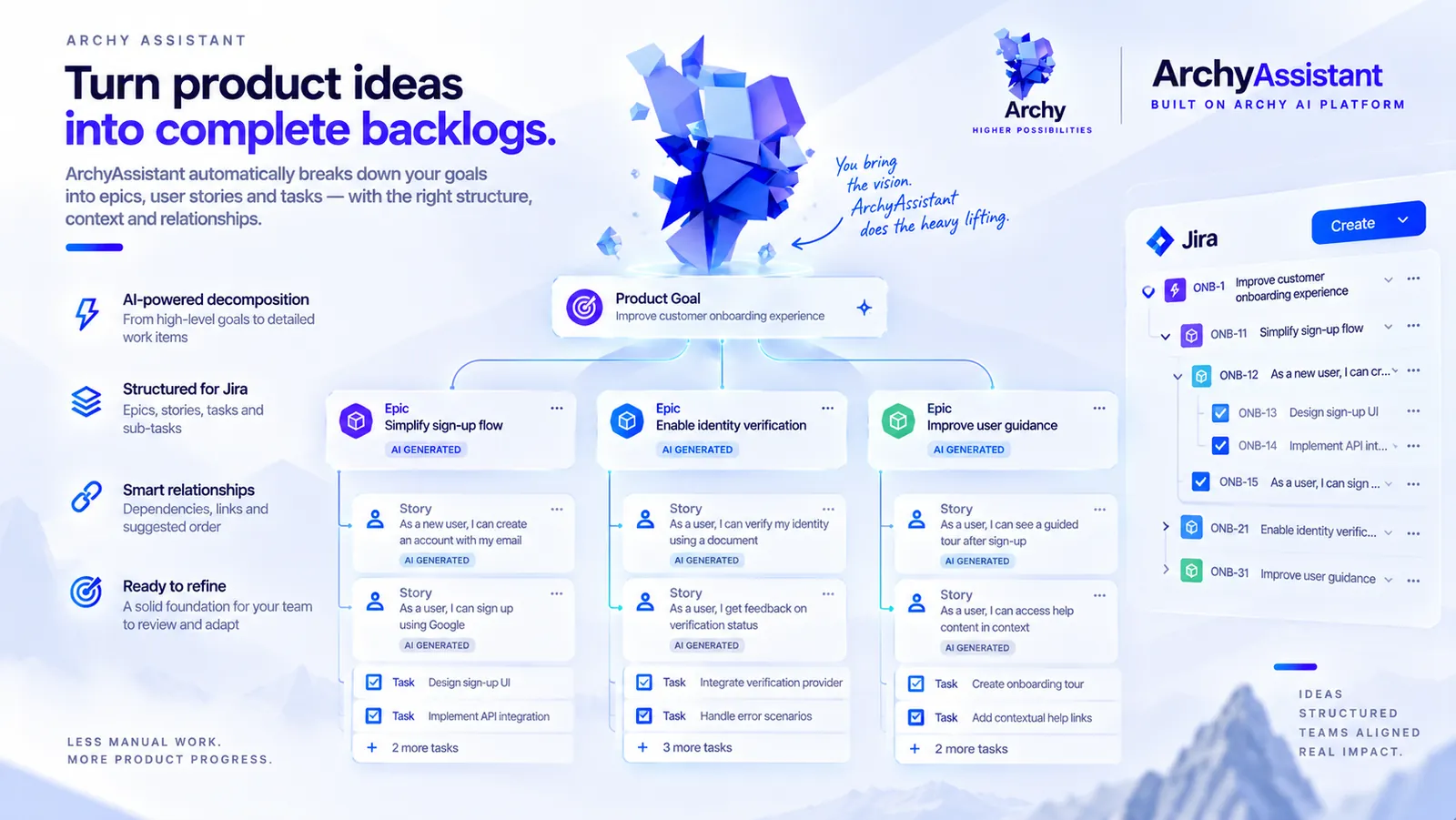
| Documentation | Each product owner writes stories and specifications in their own way. | Feature requests follow your governance standards: user story style, backlog structure, and what PRDs and solution architecture documents contain. |
| Architecture and PRDs | Written later, or not at all, and kept apart from the backlog. | PRDs and architecture documents come with the feature request and can be exported to Confluence. |
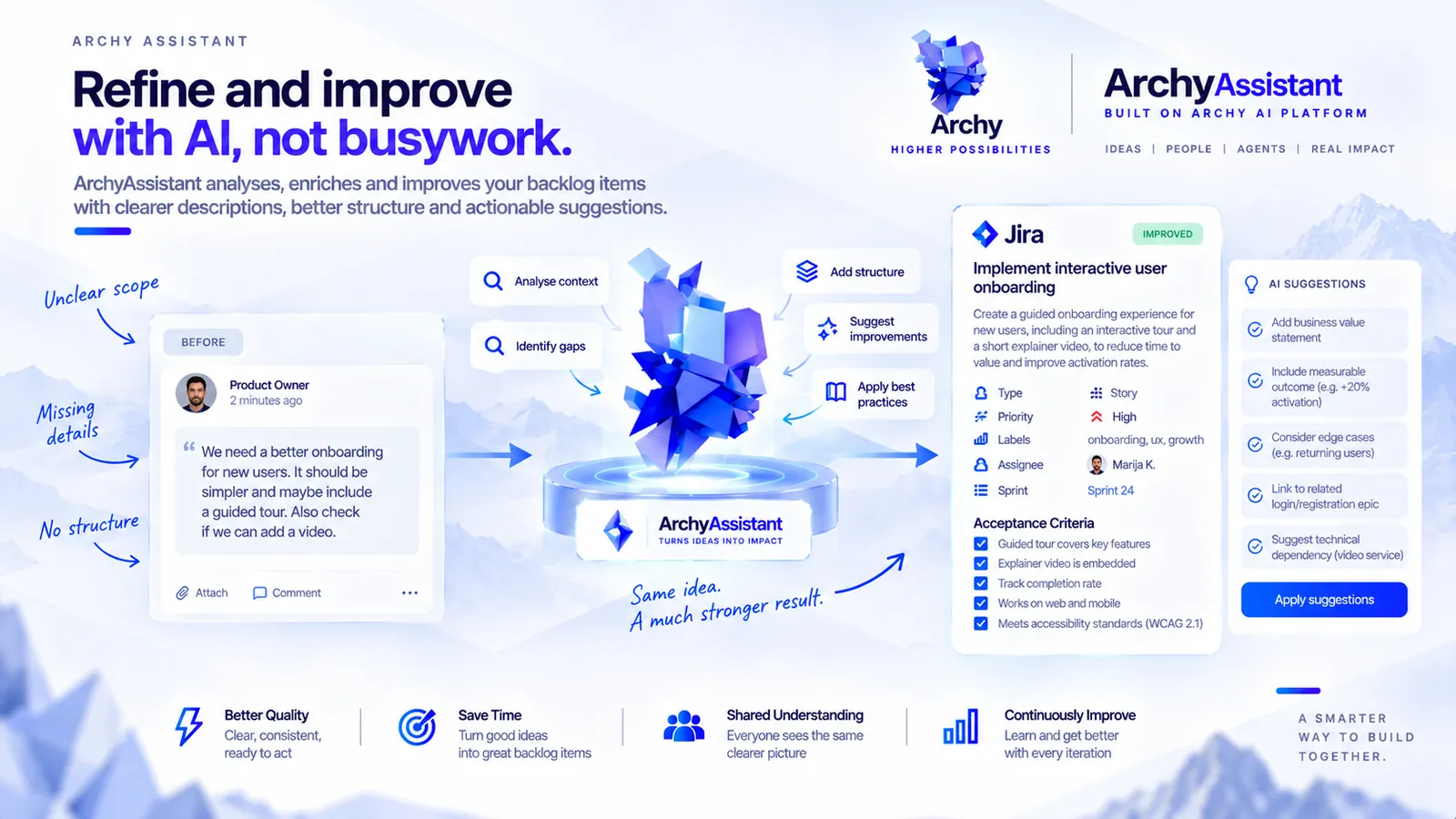
| The existing backlog | Stories and epics vary in quality and size. | Refine, split and improve individual stories and epics to the same standards. |
| Visibility for leaders | Following change means reading Jira and Confluence history project by project, and change is speeding up with AI coding agents. | Executive summaries at project and organisation level, built from Jira and Confluence changes, with activity summaries and a change history. |
| Work specific to your organisation | General-purpose AI tools know nothing about your domain. | Dedicated agents for these workflows run on the Archy AI Platform, are managed in ArchyAgents and can connect to ArchyKnowledgebase. |
Intake
Today
Requirements arrive as documents with gaps. Clarifying them takes meetings and long comment threads.
With Archy
ArchyAssistant reads the intake document, asks about what is missing or unclear, and builds on your answers.
Documentation
Today
Each product owner writes stories and specifications in their own way.
With Archy
Feature requests follow your governance standards: user story style, backlog structure, and what PRDs and solution architecture documents contain.
Architecture and PRDs
Today
Written later, or not at all, and kept apart from the backlog.
With Archy
PRDs and architecture documents come with the feature request and can be exported to Confluence.
The existing backlog
Today
Stories and epics vary in quality and size.
With Archy
Refine, split and improve individual stories and epics to the same standards.
Visibility for leaders
Today
Following change means reading Jira and Confluence history project by project, and change is speeding up with AI coding agents.
With Archy
Executive summaries at project and organisation level, built from Jira and Confluence changes, with activity summaries and a change history.
Work specific to your organisation
Today
General-purpose AI tools know nothing about your domain.
With Archy
Dedicated agents for these workflows run on the Archy AI Platform, are managed in ArchyAgents and can connect to ArchyKnowledgebase.
How it works
From an intake document to a portfolio view.
Set your standards.
Define your user story style, backlog structure, and what PRDs and solution architecture documents must contain.
Bring in the requirements.
Add an intake document with new requirements to ArchyAssistant in Jira.
Answer the guided questions.
ArchyAssistant asks about the gaps and builds on your answers.
Get documented feature requests.
Backlog items, clear requirements, a PRD and architecture documents, written to your standards. Export the documents to Confluence.
Keep the backlog in shape.
Refine, split and improve stories and epics as the work evolves.
Follow progress across projects.
Read executive summaries for each project and for the organisation.
See the work take shape
How ArchyAssistant carries the work from new requirements to a documented backlog that keeps to your standards.
Who and what is involved
The people, agents, tools and knowledge behind the work.
People
- Product owners and managers bring intake documents and answer the guided questions.
- Delivery and portfolio leads keep the backlog to standard.
- Executives read project and organisation summaries.
- Your platform or engineering team builds dedicated agents when you need them.
Agents
- ArchyAssistant, the AI assistant for Jira.
- Dedicated agents you create for these workflows, running on the Archy AI Platform.
- ArchyAgents, where you manage dedicated agents and edit, start and stop their workflows.
Tools
- Jira Cloud, where ArchyAssistant runs as an Atlassian Forge app.
- Confluence, for PRDs, architecture documents and change history.
Knowledge
- Your governance standards for stories, backlog, PRDs and solution architecture.
- ArchyKnowledgebase, when dedicated agents need knowledge from many sources in your organisation.
Example
One intake document, followed through.
Illustrative example
Input
A four-page document from the customer operations team asking for self-service refunds in the customer portal. It does not say how large a refund can be, which payment provider is used, or who can see refund history.
Guided questions (sample)
- What is the largest refund a customer can request without help from staff?
- Which payment provider processes the refund?
- Which roles can see a customer's refund history?
Output
- An epic and user stories in your organisation's story style, with clear requirements
- A PRD and a solution architecture document with the sections your standards require, exported to Confluence
- A line in the next project summary: what was added, what changed and where the documents live
Example for illustration. Your standards decide the exact structure of each document.
Products involved
The Archy products behind this solution.
- AI assistant for Jira
ArchyAssistant
Turns intake documents into fully documented feature requests and summarises change across projects.
Explore ArchyAssistant - Workbench and user interface
ArchyAgents
Create and manage dedicated agents for your delivery workflows.
Explore ArchyAgents - Data and Knowledge Platform
ArchyKnowledgebase
Gives those agents knowledge from many sources in your organisation.
Explore ArchyKnowledgebase - Idea to product definition
ArchyStarter
Before there are requirements: turn an idea into an initial product definition, emailed to you. It integrates with ArchyAssistant.
Explore ArchyStarter
ArchyAssistant
Before you start
What to have in place.
- Jira Cloud, and a Jira admin to install ArchyAssistant from the Atlassian Marketplace.
- Your current standards for user stories, backlog structure, PRDs and solution architecture, even if they are informal today.
- Confluence, if you want PRDs and architecture documents exported there.
- For dedicated agents: access to ArchyAgents and, if they need wider knowledge, ArchyKnowledgebase.
Frequently asked questions
Jira Cloud. ArchyAssistant is a Jira app built on Atlassian Forge, installed from the Atlassian Marketplace.
Yes. You define your user story style, backlog structure and the contents of PRDs and solution architecture documents. New feature requests are written to them, and existing stories and epics can be refined to match.
Backlog items live in Jira. PRDs and architecture documents can be exported to Confluence.
No. Start with ArchyAssistant in Jira. Add dedicated agents in ArchyAgents, and ArchyKnowledgebase for wider knowledge, when your workflows need them.
With ArchyStarter. Describe the idea and receive an initial product definition by email: documentation, goals, OKRs, KPIs, a sample backlog and a proposed architecture.
Yes, through an enterprise deployment: PaaS in your environment, with full data isolation and customisation.
Software delivery
Bring your next requirements document to a walkthrough.
Show us how requirements reach your teams today and the standards you work to. We will show you the same document as fully documented work in Jira.
Other solutions
The answer exists, but it is spread across files, databases and storage.
Bring it together as structured knowledge your agents can use in real workflows.
Explore knowledge to actionProducts involved: ArchyKnowledgebase · ArchyAgents
Content has to go out every week, on brand, on every channel.
Go from one brief to published articles and team-approved social posts.
Explore content operationsProducts involved: ArchyPress · ArchySocial
You have an idea, but no product definition yet.
Describe it and receive documentation, goals, OKRs, KPIs, a sample backlog and a proposed architecture by email.
Explore ArchyStarterProducts involved: ArchyStarter